
How a café gets listed
Libut Café starts from what cafés post themselves, usually on Facebook and Instagram. Every café that’s open is Listed with whatever has been found so far, so some start with gaps: no photos yet, or hours still to find. Hours only ever come from the café’s own pages.
Until a visit, a café’s pictures come from its own posts; if it has none that work, from customers’ public posts or, for a chain, a brand image or its logo. Every one is credited on the café’s page. Libut Café never imports Google ratings, reviews, photos or hours (Google Maps is used for the pin’s position only), and never copies prices from delivery apps.
Claim your café
- In the app, open your café and tap Own this café? Claim it at the bottom of its page, or go to About → Own a café?
- Leave your name, your role, and a way to reach you: an email, a phone number, an @handle, or a link to the café’s Facebook, Instagram or TikTok.
- We’ll get in touch, for example through the café’s own page, to confirm it’s really yours.
No app yet? Email libutcafe@raiyanasaral.com with your café’s name and branch, and a way to check it’s yours.
Hours, menus and contacts
Once your claim is confirmed, send changes in the app (Something wrong? Tell us on your café’s page) or by email, and we’ll update the listing. Your changes are marked “Updated by owner”. Changes to the café’s name, location or contact details are checked by us first.
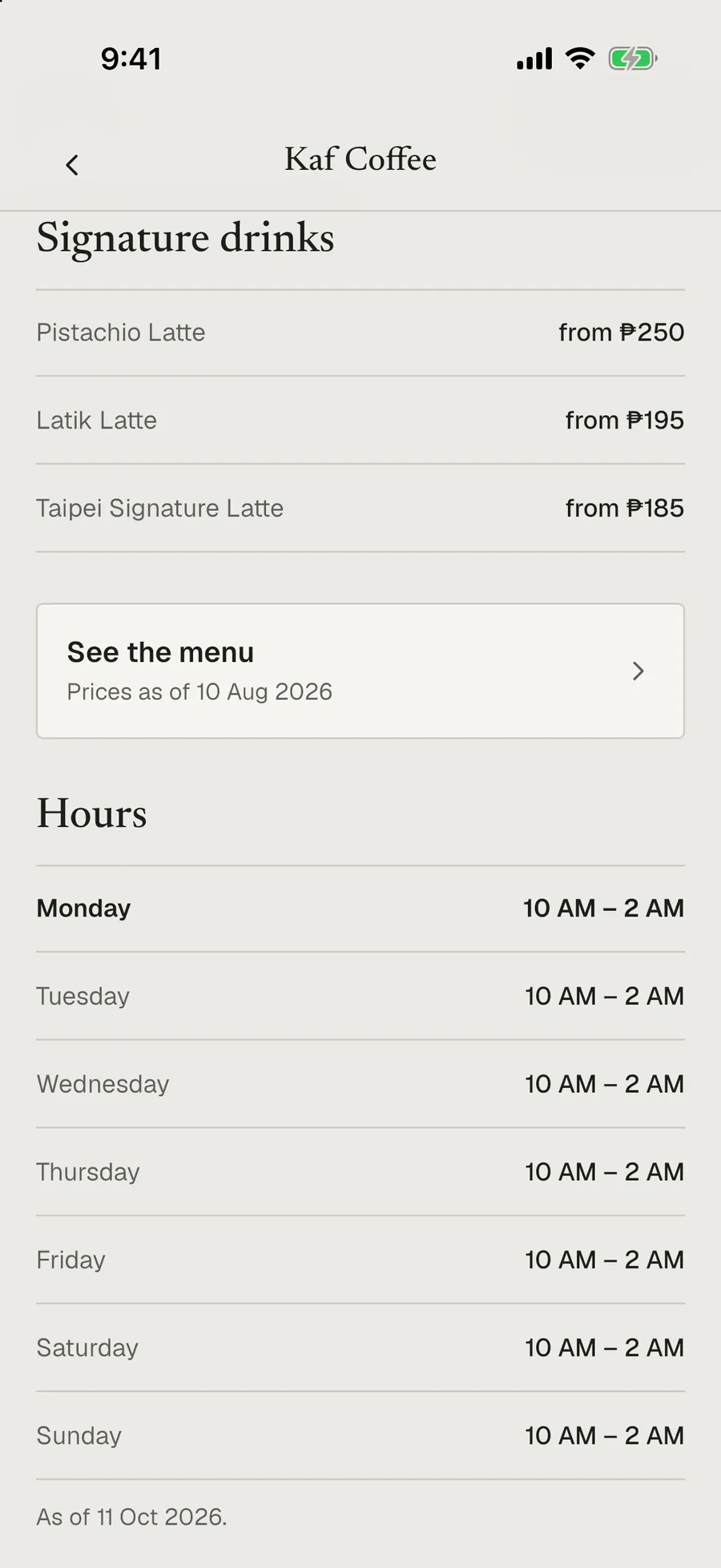
- Hours show “As of” the date they were checked, and “Unconfirmed” once they’re six months old. A quick message when they change keeps your café looking current.
- Menus come from your own posted menu, dated by your post, with a link to the original photo. Post or send a new menu when prices change.
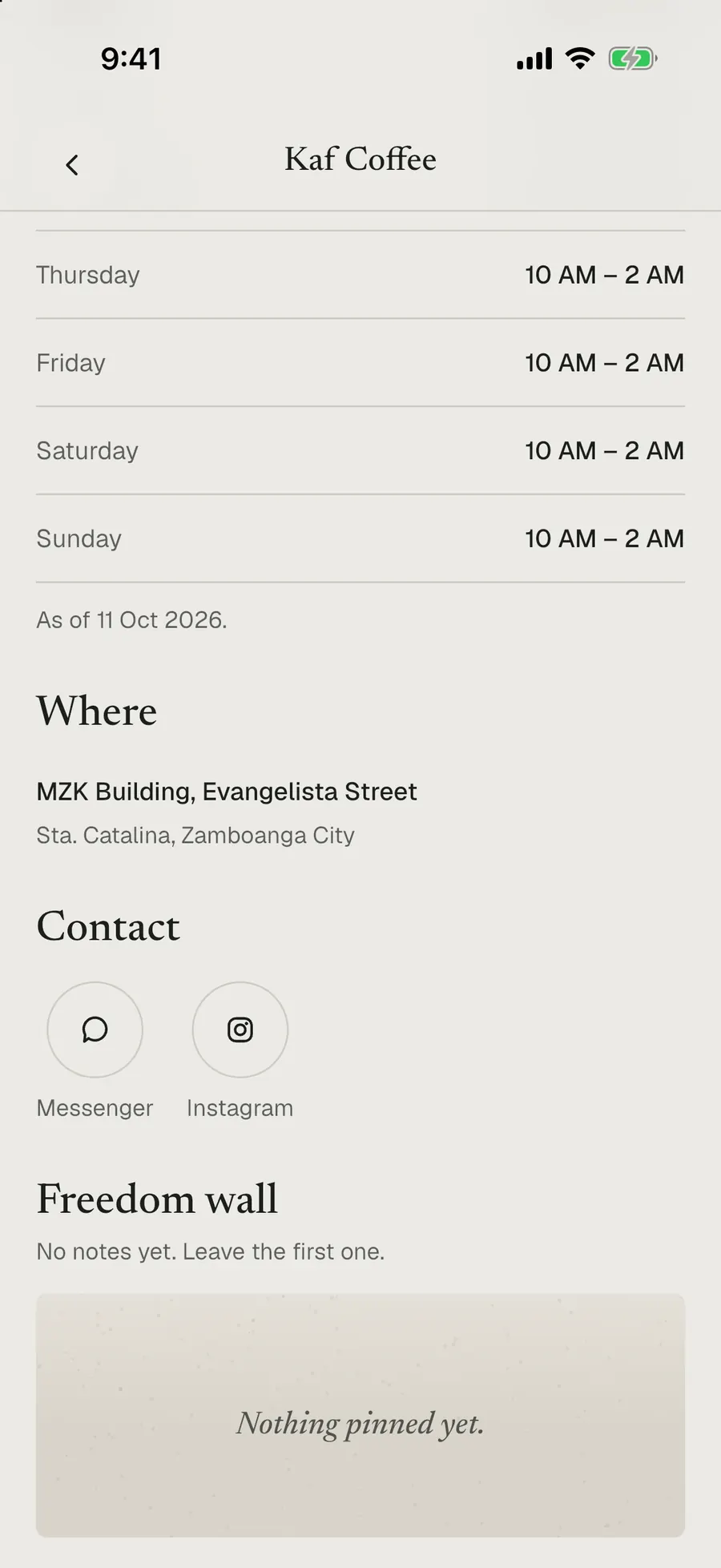
- Contact buttons (Messenger or Facebook, Instagram, text and call) show what your café has made public. Confirm them with us and the page says “Contact details confirmed by the owner”, with the month.
Here’s how that looks, using Kaf Coffee’s page as it was on 12 October 2026:

What gets checked on a visit
Libut Café is visiting every café in person. You don’t need to prepare anything, and you can’t pay for a visit. After it, your café shows a Verified seal with the month of the visit, and it’s due another look six months later. A visit records:
- Working thereWi-Fi and any time limit, outlets, how loud it is, table space, and whether staying to work is fine.
- The spaceOutdoor seating, a private room and how many it fits, parking, and pets.
- Price levelFrom the price of a typical espresso drink: under ₱120, ₱120 to 180, or over ₱180.
- PhotosLibut Café’s own, which replace the ones taken from posts.
- The menuPhotographed and dated, which is also how “No pork served” gets checked.
- A short take and a ratingLibut Café’s own opinion of the coffee, food, space and value.
Pop-ups and events
No fixed store? Pop-up brands are listed too, found through where they’ll be next. Events show on Discover under “Happening soon” and on your page under “Coming up”, with dates, hours, venue, booth and directions. Send us a link to your post about the event.
Halal status
Libut Café records halal status only as one of: certified (with the certifier’s name), no pork served, or Muslim-owned. Anything else shows “Not verified”. If your café’s halal status has changed, tell us; it’s checked before it shows.
Photos
Photos taken from your posts, or from customers’ public posts about your café, stay credited to whoever posted them. If you’d like any taken down or swapped, email us and we’ll remove them within days.
Your café’s wall
Every café page has a freedom wall: short notes from people who are at the café. Notes that break the wall rules are removed. As a confirmed owner, you can ask us to hide a note on your wall. We’ll usually do it; if we think a fair note should stay, we may keep it up.
Paying
Being listed is free, and paying can never change where a café appears. If Libut Café offers a paid spot in the future, it will always be labelled Sponsored and will never change the order of lists, search, the map or filters.
Coming before launch
Libut Café isn’t in the App Store or Google Play yet. Before it launches, confirmed owners will be able to sign in and keep their own café’s details up to date from inside the app. Until then, send changes in the app or by email.
Anything else: libutcafe@raiyanasaral.com. Tell us your café’s name and branch.